Try Better Bookshelf free — catalog your first 50 books, no sign-up.
Features
Every feature, ranked by value
Twenty features across four tiers — from whole-shelf scanning and finding books on your shelves, to the reading and import tools that keep your library useful, to the polish details that make it feel premium every day.
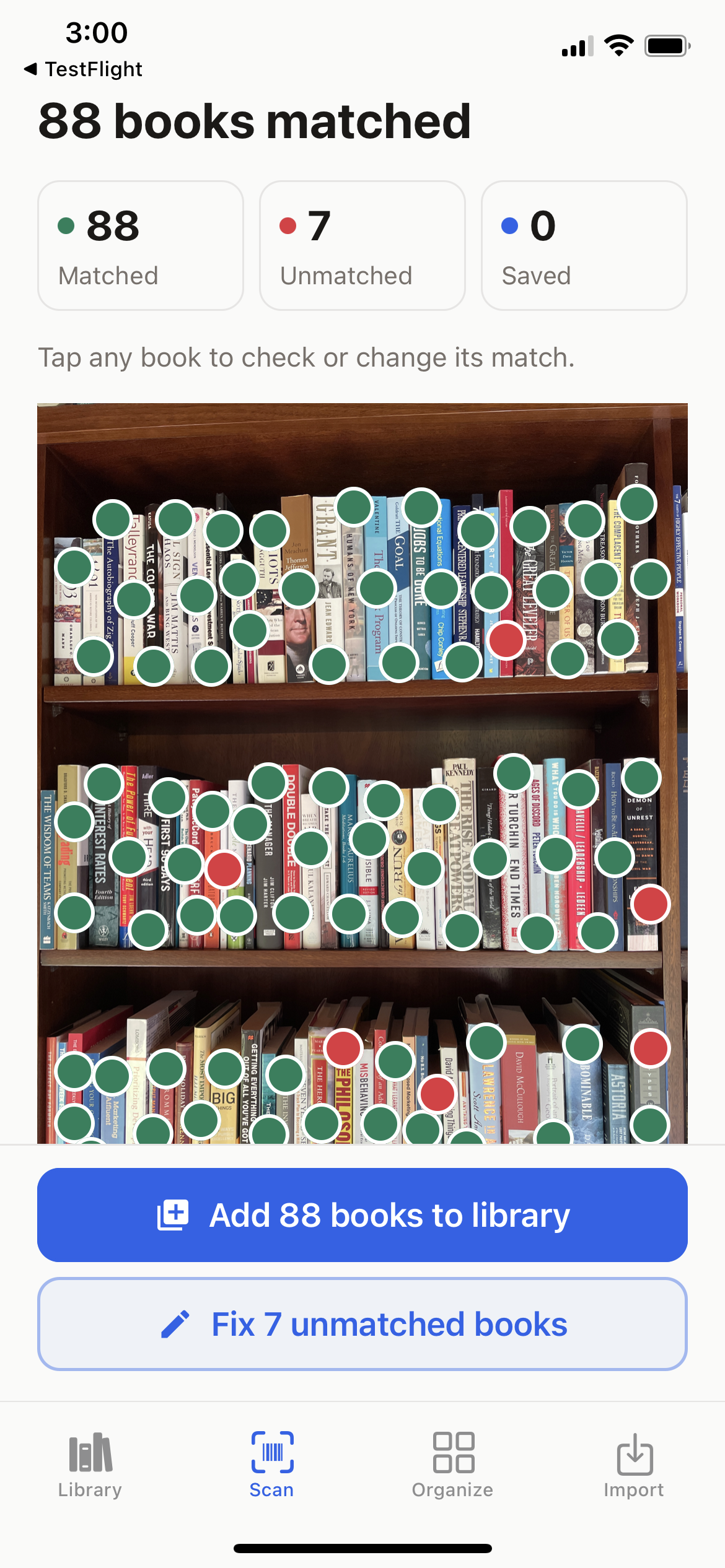
A real bookshelf. A real scan.
One photo.
88 books matched.
Leave the books on the shelf. Take a clear photo, and Better Bookshelf suggests the titles and marks their positions. Add the matched books together, then tap the red dots to identify the rest.
Scan your shelf
Build your catalog without entering every title.
Search for a book
Find a title or author across your saved shelves.
See where it belongs
Open its marked position in your shelf photo. Update the photo when your books move.
This iPhone test scan returned 88 matches and 7 books needing help. Matches are title suggestions, not a verified accuracy score. Results vary with the books and photo quality. Shelf scanning is an upgrade feature.
Core Value
Why people download — the features that make Better Bookshelf worth installing in the first place.
ISBN Barcode Scanner
Add individual books by scanning an ISBN barcode. Available book details and cover art fill in automatically.
Automatic Metadata Fetch
Find titles, authors, covers, and descriptions from book catalogs. You can correct details or add a cover when a record is incomplete.
Whole-Shelf AI Scanning
Photograph a whole bookcase and AI identifies the spines and marks each book's position. Add the matches together, then tap the red dots to identify the rest by barcode, title, or a book already in your library. Six scans included with Unlimited.
Google Drive Backup & Restore
Back up your library and saved shelf photos to your own Google Drive. Keep a current backup so you can restore your collection on another device.
Retention
Why people keep using it — the features that turn a one-time cataloging session into a daily habit.
Reading Status Tracking
Mark books as Unread, Reading, or Read. Always know where you are in your reading journey and what's coming next.
Multi-Format Tracking
Physical, Kindle, and Audible editions tracked per book with format badges. You own Dune in three formats — Better Bookshelf shows it as one book, not three entries. Merges formats automatically on import and deep-links via ASIN.
Kindle & Audible CSV Import
Bring your entire digital library in with one file. Auto-detects format from Goodreads, Calibre, LibraryThing, Kindle, and Audible CSVs. No manual mapping required.
Ratings & Reviews
Personal star ratings and written reviews, plus a built-in reading list for what's next. Rate books on a five-star scale and write reviews to remember what you loved (or didn't).
Book Lending Tracker
Keep track of who has your book and when you lent it. Filters let you see everything out on loan at a glance. Never lose track of a borrowed book again.
Manual Book Search
Search by title, author, or ISBN. Choose the right result and add it to your collection.
Power User
Why people recommend it — the features that make Better Bookshelf unlike anything else on the market.
Find Books on Your Shelves
Search your saved shelves by title or author, or tap Find on shelf from any book. The shelf photo opens with that spine highlighted, plus a close-up and directions like "two books left of Dune". Works offline.
Update a Shelf with a New Photo
Give each shelf a name, like Office · West bookcase. When books move, take a new photo: the app shows how many previous books it found again and which locations it will clear, then you save or discard the update.
Readwise Integration
Bring supported highlights and notes from Readwise into your library so you can revisit what you read.
Favorites
Quick-access list of your most-loved books. Star your favorites for instant retrieval from anywhere in the app.
Custom Tags
Flexible categorization beyond genre. Create custom tags for any system you can imagine — by mood, by owner, by location, by anything.
CSV Export
Full data portability. Export your entire library — books, tags, ratings, reviews, lending records — to CSV anytime. Your library is always yours, always portable.
Auto-Backup Toggle
Enable automatic backups to your own Google Drive and check that your latest backup is available before changing devices.
Polish
Why it feels premium — the details that make Better Bookshelf a joy to use every day.
Dark Mode
Beautiful light and dark themes that adapt to your environment. Read comfortably in any lighting condition.
Haptic Feedback
Tactile response on key interactions. Every scan, every save, every toggle feels physically satisfying.
Cover Photo Identification
For a single book with no barcode, photograph the cover and AI reads the title and author. Uses one scan credit, like a shelf photo.
The Standout
Photograph the shelf. Find the book later.
Cataloging apps need the book in your hand: a barcode to scan or a title to type. Better Bookshelf can start from a photo of the whole bookcase. AI reads the spines, marks each book's position, and checks your existing library so books you already cataloged are linked rather than duplicated. You add the confident matches together and identify the uncertain ones by barcode, title, or a book you already own.
The photo is the part that lasts. Search for a title later and the app opens that shelf with the spine highlighted, a close-up, and directions like "two books left of Dune". When books move, a new photo updates the shelf and shows you what changed first.
How shelf scanning works, step by stepBuilt to last
Beyond the feature list, Better Bookshelf is engineered around three principles that matter to anyone who's been burned by cloud-first apps before.
Private by design
Your library, shelf photos, and reading history live in a local database on your phone. No sign-up, no ads. A shelf photo leaves your device only when you choose to scan it, and the app asks first.
Works offline
Browsing, searching, tagging, and finding a book on your shelves all work with no connection. Network is needed only to fetch book details, run an AI scan, or back up to Drive.
You own your data
Full CSV export anytime. Google Drive backups, including your shelf photos, go to your own account. Your catalog never depends on our servers.
Ready to organize your library?
Free for your first 50 books. Upgrade once for an unlimited library and 6 whole-shelf AI scans.
Available for iPhone and Android. Shelf scanning requires version 1.8.0 or later.